The Customer's Internet Looked Fine in a Short Test
I was called out to help a client who could not reliably remote into their work computer from home. Their workplace IT department had already checked the office side of the connection and found that the problem only happened from the client's residence.
Short speed tests from the client's home ISP produced normal-looking results, yet the client was unable to maintain a sustained Remote Desktop session while trying to work from home. In this case, the provider was NMSurf.
Testing Directly at the ISP Modem
As a network technician, I was called out to diagnose the issue. My test laptop was connected directly by Ethernet at the ISP modem, bypassing the client's router, Wi-Fi, and internal network equipment.
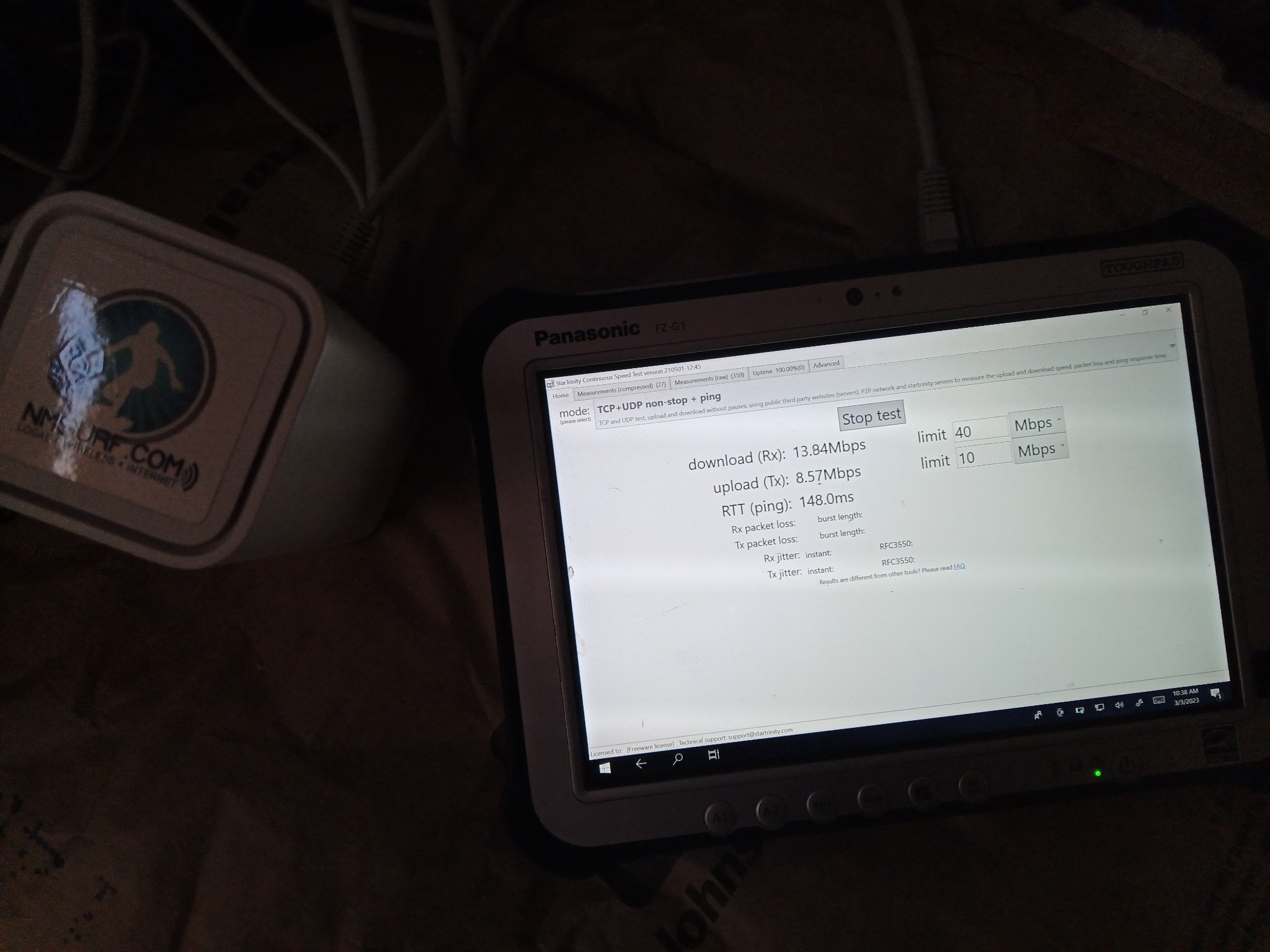
The field laptop running a continuous StarTrinity test beside the provider equipment. The display shows approximately 13.84 Mbps download, 8.57 Mbps upload, and 148 ms RTT at the moment photographed.
The 67 Mbps Result That Did Not Tell the Whole Story
One three-minute speed test at Fast.com reported a 67 Mbps download. Looking only at that number, the service might appear healthy. The same test also displayed 3.2 seconds of loaded latency.
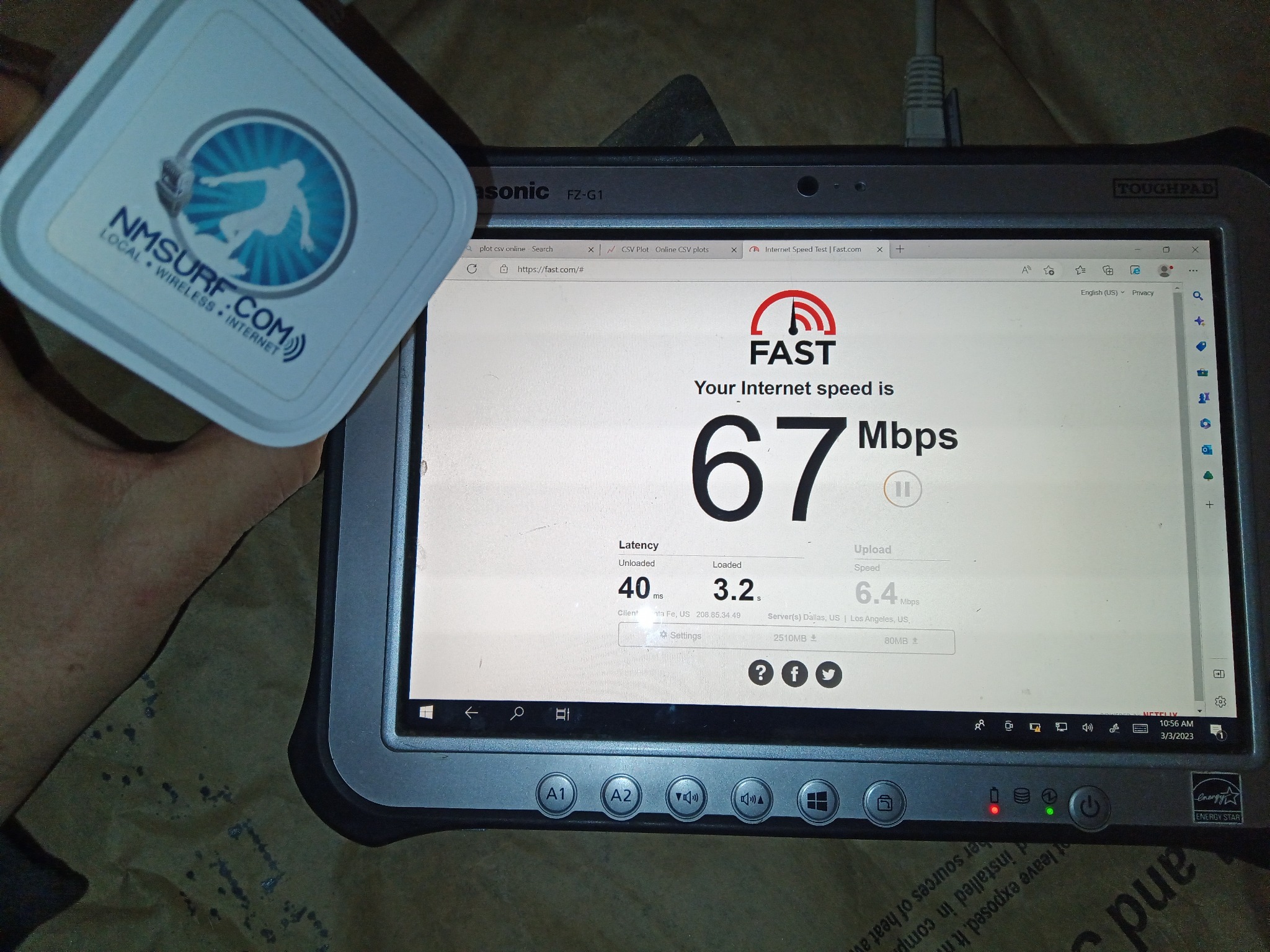
The headline speed looked acceptable, but loaded latency reached 3.2 seconds. That level of delay can make interactive remote work feel frozen even while a download test continues to report a respectable Mbps number.
What the Extended Testing Recorded
Multiple test sessions were recorded during the troubleshooting process. The results varied considerably, which was part of the problem: a short spot check could land during a better interval and miss the periods when the connection was much worse.
CSV exports from the continuous long-term speed tests revealed sustained latency problems, unstable throughput, and large differences between test periods that a short speed test could easily miss.
The raw test data can be downloaded here: NMSurf ISP results 1 and NMSurf ISP results 2.
Latency Across the Test Sessions
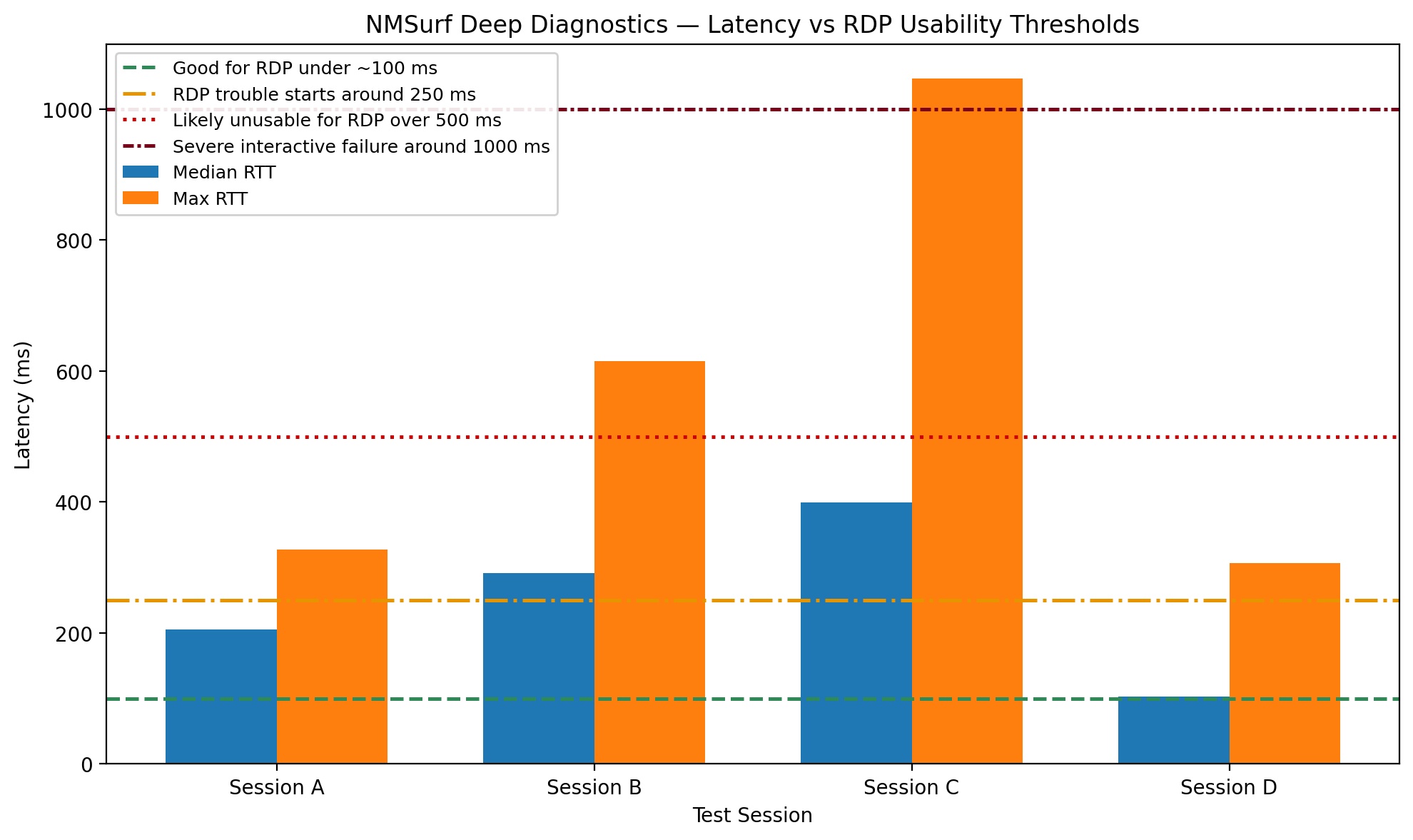
Latency changed substantially between sessions. Session C recorded a median RTT of 399 ms and a peak of 1,047 ms. The colored reference lines are approximate usability guides, not hard Microsoft pass-or-fail limits.
Session C: Sustained RDP-Degrading Latency
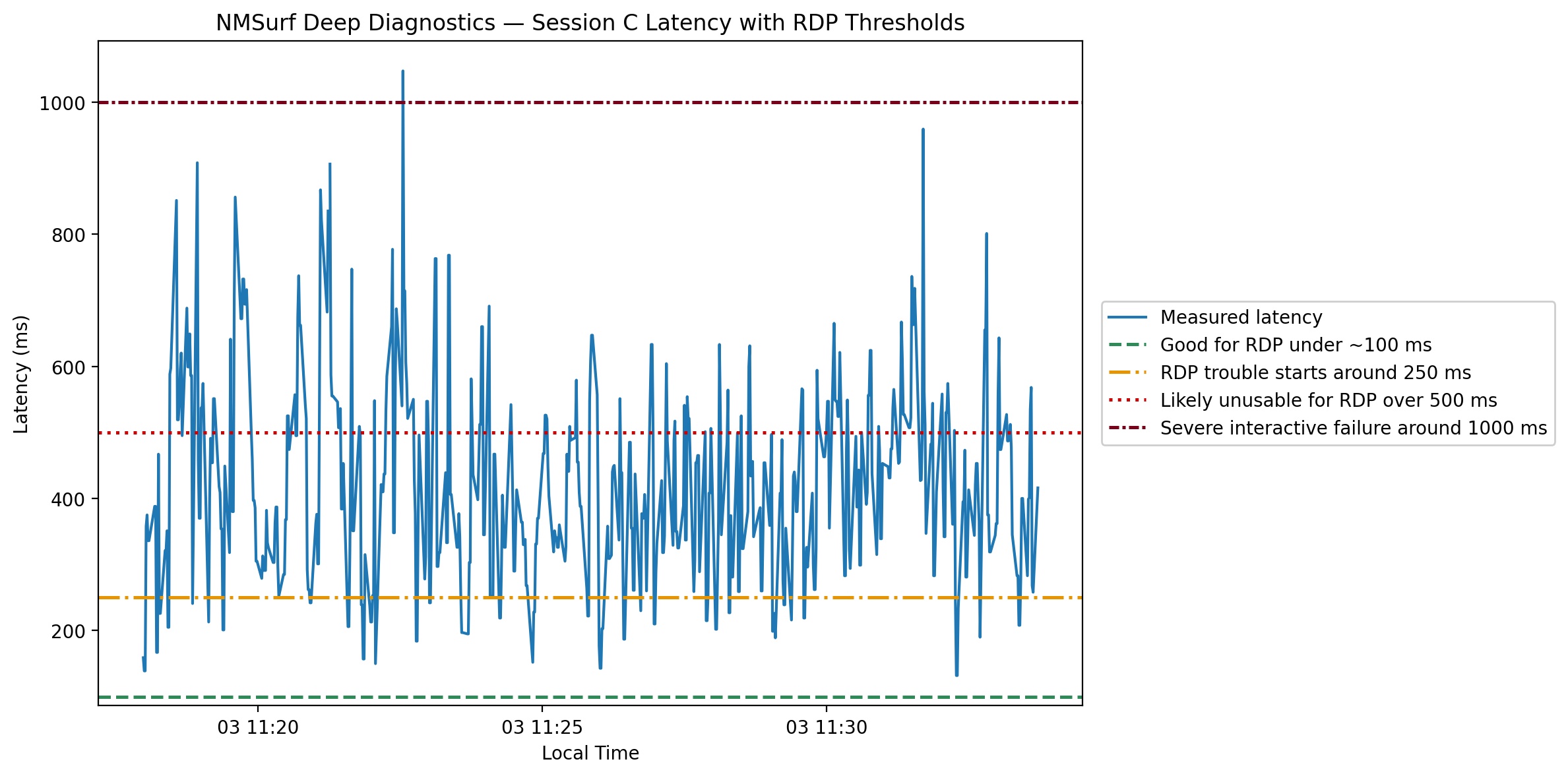
During this detailed session, latency remained elevated for much of the test and repeatedly entered ranges where interactive remote work would be noticeably delayed or difficult to use.
The Connection Improved Later but Was Inconsistent
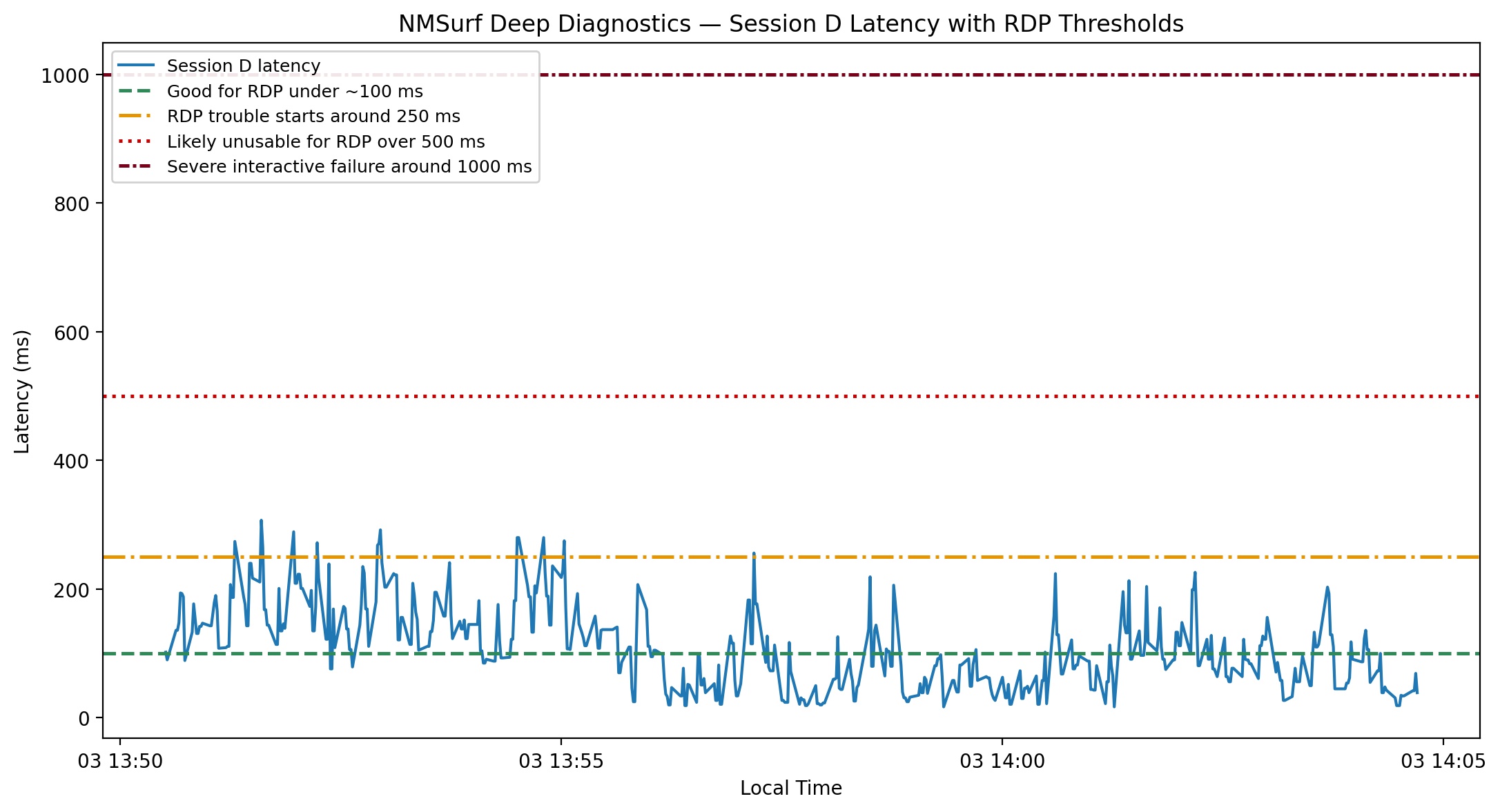
A later session performed better, with a median RTT near 103 ms, but still reached 307 ms. This variation helps explain why a provider's short test could appear normal while the customer's repeated experience remained poor.
Throughput Changed by Test Period
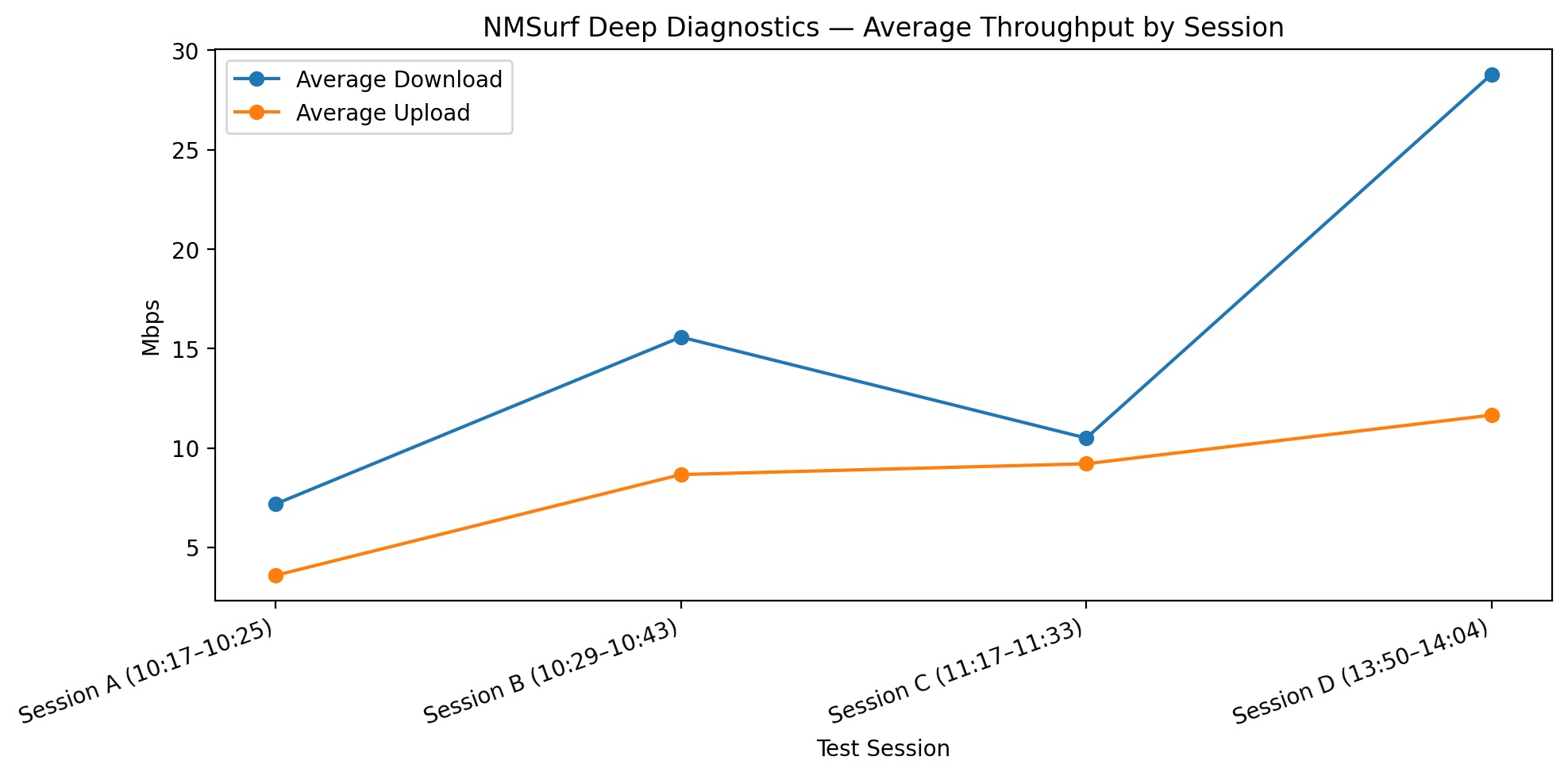
Average download throughput ranged from roughly 7.2 Mbps to 28.8 Mbps across the recorded sessions. The inconsistency mattered as much as any single result.
Why the Provider's Response Was Concerning
The most concerning part of this case was not simply that the connection had a technical problem. Internet services can develop intermittent faults, and those faults can be difficult to reproduce.
The concern was that the provider continued to rely on its own short internal checks through its network and wireless equipment, even after extended testing directly at the modem showed that the delivered connection was not operating normally.
The client was left with internet that could not reliably support their work connection. They were also left confused about what was actually wrong and felt as though they were being blamed for a problem with their own equipment, even though the router, Wi-Fi, and internal network had already been bypassed during testing.
My testing did not support blaming the client's equipment. A separate technician laptop, connected directly to the ISP modem, reproduced the same severe latency and unstable performance.
In this case, the provider was NMSurf. Their systems may have shown that the radio and modem were online, but that did not prove the connection being delivered to the client was stable or usable. A short internal check is not a substitute for testing sustained latency, dropouts, and the real application the client was trying to use.
Why "Everything Is Fine on Our End" Was Not a Complete Diagnosis
The results did not support dismissing this as a problem inside the client's home network. The client's equipment had been bypassed, a separate technician laptop was connected directly to the ISP modem, and the same poor performance appeared across multiple tests.
The provider performed its testing remotely through its own network and wireless antenna equipment. Those checks may have shown that the radio was connected and that traffic could pass through the provider's system, but they did not test the connection at the client's modem under the same conditions the client was experiencing.
The provider would not send a technician to test directly at the modem. That left the client with a connection that appeared normal from the provider's side, while sustained testing at the actual service handoff continued to show severe latency and unstable performance.
After the customer moved to Starlink, the RDP problem was resolved. This case reflects one customer's connection during one troubleshooting period and should not be taken as representative of NMSurf's overall network performance or as an indication of the service another customer may receive. It documents a specific issue that was reproduced through direct testing at this customer's modem.
What a Proper Deep Internet Diagnostic Should Include
- A wired test that bypasses Wi-Fi and the customer's router when possible.
- Continuous latency measurement rather than one brief ping.
- Sustained download and upload testing over several minutes.
- Testing during both good and bad periods.
- Real-world application testing, such as RDP, VPN, VoIP, or video conferencing.
- Comparison testing with a separate known-good computer and Ethernet cable.
- Preservation of raw CSV data, screenshots, timestamps, and video.
Important Note About the RDP Reference Lines
The 100 ms, 250 ms, 500 ms, and 1,000 ms lines shown in the graphs are practical reference ranges used to help nontechnical readers understand the effect of delay. They are not official Microsoft disconnect thresholds. Actual RDP usability also depends on jitter, packet loss, graphics settings, workload, server performance, and the route between the user and server.
Internet Speed Looks Fine, but Your Network Still Fails?
Try our free network testing tool to discover more about your network connection!
Active InSite provides advanced network troubleshooting, Wi-Fi diagnostics, latency testing, VPN and Remote Desktop troubleshooting, business networking, and low-voltage services throughout Santa Fe, Albuquerque, and surrounding New Mexico communities.
Contact Active InSite